单例模式

单例模式的定义


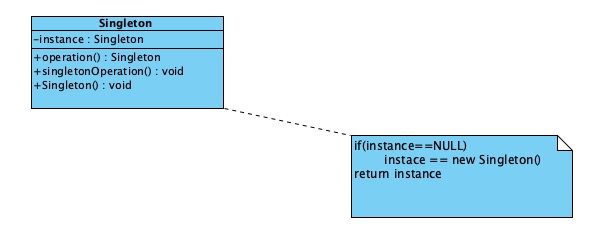
定义:保证一个类仅有一个实例,并提供一个可以全局访问他的方法

在JavaScript中与传统的单例模式稍有不同,后面会具体讲解

特点:

  • 单例类只能有一个实例
  • 单例类必须自己创建自己的唯一实例
  • 单例类必须给所有其他的对象提供这一实例

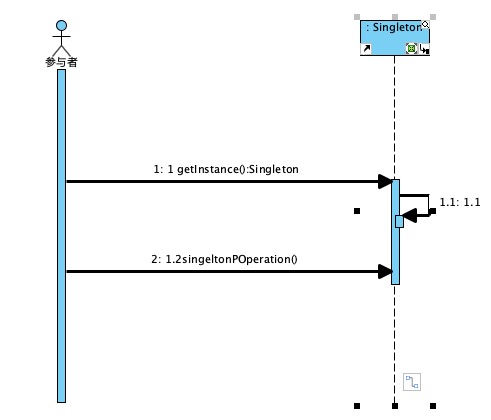
实现思路:判断系统是否已经含有这个实例,如果有则返回,如果没有则创建

优点:
1.在内存里只有一个实例,减少内存的开销,尤其是频繁的创建和销毁实例
2.避免对资源的多重占用

缺点:没有接口,不能继承,与单一职责原则冲突,一个类应该只关心内部逻辑,而不关心外面怎么样来实例化

应用场景:

  • 要求生产唯一序列号
  • WEB中的计数器,不用每次刷新都在数据库里面加一次,用单例先缓存起来
  • 创建一个对象需要消耗的资源过多,比如I/O与数据库的连接等

单例的实现


Java 实现

1
2
3
4
5
6
7
8
9
10
11
12
13
14
15
16
17
18
19
20
21
22
23
24
25
26
27
28
29
30
31
32
public class SingleObject {

//创建 SingleObject 的一个对象
private static SingleObject instance = new SingleObject();

//让构造函数为 private,这样该类就不会被实例化
private SingleObject(){}

//获取唯一可用的对象
public static SingleObject getInstance(){
return instance;
}

public void showMessage(){
System.out.println("Hello World!");
}
}

public class SingletonPatternDemo {
public static void main(String[] args) {

//不合法的构造函数
//编译时错误:构造函数 SingleObject() 是不可见的
//SingleObject object = new SingleObject();

//获取唯一可用的对象
SingleObject object = SingleObject.getInstance();

//显示消息
object.showMessage();
}
}

JavaScript 实现

1
2
3
4
5
6
7
8
9
10
11
12
13
14
15
16
17
18
19
// es5
var Singleton = function(name) {
this.name = name;
//一个标记,用来判断是否已将创建了该类的实例
this.instance = null;
}
// 提供了一个静态方法,用户可以直接在类上调用
Singleton.getInstance = function(name) {
// 没有实例化的时候创建一个该类的实例
if(!this.instance) {
this.instance = new Singleton(name);
}
// 已经实例化了,返回第一次实例化对象的引用
return this.instance;
}
var a = Singleton.getInstance('sven1');
var b = Singleton.getInstance('sven2');
// 指向的是唯一实例化的对象
console.log(a === b);
1
2
3
4
5
6
7
8
9
10
11
12
13
14
// es6
class Singleton {
constructor(name) {
this.name = name;
this.instance = null;
}
// 构造一个广为人知的接口,供用户对该类进行实例化
static getInstance(name) {
if(!this.instance) {
this.instance = new Singleton(name);
}
return this.instance;
}
}

应用示例:实现一个单例弹窗

1
2
3
4
5
6
7
8
9
10
11
12
13
14
15
16
17
18
19
20
21
22
23
24
25
26
27
28
29
30
31
32
33
34
35
36
37
38
39
40
41
42
43
44
45
46
47
<!DOCTYPE html>
<html lang="en">
<head>
<meta charset="UTF-8">
<meta name="viewport" content="width=device-width, initial-scale=1.0">
<meta http-equiv="X-UA-Compatible" content="ie=edge">
<title>单例实现登录弹窗</title>
<style>
.login-layer {
width: 200px;
height: 200px;
background-color: rgba(0, 0, 0, .6);
text-align: center;
line-height: 200px;
display: inline-block;
}
</style>
</head>
<body>
<button id="loginBtn">登录</button>
<script>
const btn = document.getElementById('loginBtn');
btn.addEventListener('click', function() {
loginLayer.getInstance();
}, false);

class loginLayer {
constructor() {
this.instance = null;
this.init();
}
init() {
var div = document.createElement('div');
div.classList.add('login-layer');
div.innerHTML = "我是登录浮窗";
document.body.appendChild(div);
}
static getInstance() {
if(!this.instance) {
this.instance = new loginLayer();
}
return this.instance;
}
}
</script>
</body>
</html>